

How to Use REI Software to Analyze Properties
Real estate investing can be a daunting journey for beginners, especially when faced with complex calculations and data. Fortunately, dedicated Real Estate Investing software makes it much easier to analyze deals and make informed decisions. Instead of wrestling with spreadsheets and guesswork, these tools gather property data, crunch numbers, and display key metrics (like cash flow, ROI and cap rate) for you. We’ll explain step-by-step how to use REI software to analyze properties, with clear examples and expert tips. You’ll learn why these tools are essential, how to input your numbers, and what to look at in the results. In the end you will feel confident evaluating a property deal like a pro.
Investing in property starts with the numbers. How much will it cost? What will it earn? REI software answers these questions instantly. In a few clicks, you can import data (often automatically from sources like MLS, Zillow or Rentometer) and get detailed projections. For example, DealCheck lets you “import dozens of property data points list price, value & rent estimates, property taxes, photos,etc. In practice, this means the software can pull in the purchase price, estimated market value, tax history and even rental comps for you. A guided data entry wizard makes it simple: enter your purchase price, financing terms, rehab budget and expected rents, and the program handles the rest. For a beginner, this is a game-changer. You’re not fumbling through formulas – the software instantly computes each deal’s cash flow, cash-on-cash return and cap rate. DealCheck, for instance, allows you to instantly view each property’s cash flow, cap rate, ROI, profit from sale, acquisition costs, etc with one click. This immediate feedback helps you know at a glance whether a property is likely profitable or not.
Understanding these numbers is key. Software like Mashvisor emphasizes that DIY calculations can be difficult if doing manually. REI tools automate these calculations and keep them error-free. For example, if you change any input (like raising expected repairs or lowering rent), the software automatically recalculates all metrics. This interactivity lets you experiment with different scenarios. If the estimated ROI goes negative after adjusting expenses, you know the deal doesn’t work. Beginners especially benefit from seeing these shifts visually. A good rental analysis tool will even flag a property’s cash flow as positive or negative to let you know whether an investment is going to make money or lose money. In short, REI software cuts down on guesswork and helps you feel confident in your decisions.
Why Use REI Software for Deal Analysis
Using specialized REI software offers several advantages over manual methods:
- Speed and Accuracy: Spreadsheets are prone to errors. REI tools compute financial projections instantly and correctly. This saves hours of work.
- Visual Insights: These programs often present data with charts and color-coded outputs. For instance, software dashboards can show pie charts or graphs breaking down your costs and returns. This makes it easy to see at a glance if a deal is worth pursuing.
- All-in-One Analysis: Most REI apps combine multiple analysis tasks. They import data, run ROI, cap rate and cash-flow calculators, and even fetch recent comparable sales to estimate ARV (After Repair Value). In other words, you get everything in one place, rather than using separate calculators.
- Scenario Testing: With one click you can change your assumptions (like rent, expenses or exit price) and instantly see the impact on returns. This means you can compare “what-if” scenarios for flips, rentals or other strategies without redoing the math.
- Professional Reports: Many tools can generate polished reports or PDFs of your analysis. This is handy when seeking financing or partnership.
These benefits add up. Having a good rental calculator is indispensable and serves as a guide for making good investment decisions. In practice, using REI software to analyze properties helps investors avoid costly mistakes and focus on deals with real profit potential. And since most of these tools are designed for beginners and experts alike, you don’t need any accounting background – just input the numbers and see the results.
Key Financial Metrics to Know
Before we dive into using the software, let’s quickly define the key financial metrics that REI tools calculate. Understanding these will help you interpret the results:
- Cash on Cash Return (CoC): Net annual cash income divided by the total cash invested. It shows your annual return on the cash you put in. For example, if you earn $8,000 in net rental profit on a $100,000 cash investment, your CoC is 8%.
- Capitalization Rate (Cap Rate): Net Operating Income (NOI) divided by property value. It indicates the property’s return independent of financing. For instance, if a property nets $12,000 per year and costs $200,000, the cap rate is 6%.
- Return on Investment (ROI): Total profit from the investment divided by the total cost. This is often expressed as a percentage and may consider sale profit, tax benefits, etc. It’s a broad measure of the deal’s profitability.
- Gross Yield: Annual rental income divided by purchase price. This tells you the raw percentage of rent you get back before expenses.
- Debt Service Coverage Ratio (DSCR): NOI divided by annual debt payments. Lenders use it to see if income covers the mortgage. If DSCR is below 1.0, the rent doesn’t fully cover the loan.
Each of these metrics tells a different part of the story. In practice, you’ll want to look at multiple figures together. For beginners, CoC and cap rate are especially useful. A cap rate around 8–12% is often considered healthy, and a positive cash-on-cash return (e.g. above 6–8%) means the property should generate income each year. REI software will automatically compute these for you once you enter your data, so you can review them without doing the math yourself.
By using the software’s built-in calculators for these metrics, you avoid manual errors. For example, calculating cash flow by hand (rent minus all expenses) is easy to forget something. Software ensures you include taxes, insurance, vacancies, and other costs properly. In short, let the tool handle the arithmetic – you just focus on the results.
How to Use REI Software to Analyze Properties (Step-by-Step)
Learning how to use REI software to analyze properties is easiest when broken into clear steps. Here’s a straightforward workflow:
Gather Your Property Data. Before opening any software, collect all the numbers you’ll need. That means noting the purchase price, expected rent, and any fees or taxes. Also tally financing details (interest rate, term, down payment) and recurring expenses (insurance, HOA fees, maintenance, etc.). One real estate guide advises listing things like taxes, insurance, interest rates, mortgage payments, utilities, vacancy rates, renovation costs and more when preparing an analysis. The more accurate your inputs, the more reliable the results. It can take effort to track down all this info, but as Bay Management Group puts it, missing key data will lead to inaccurate estimates of your returns. Save your data in a note or spreadsheet so you can easily enter it into the software.
Input or Import the Data into the Software. Now open your chosen REI tool (such as DealCheck, PropStream, etc.) and either import property info or type it in. Many modern platforms let you search for the address and automatically pull in data. For instance, DealCheck allows you to import list price, value and rent estimates, etc just by searching the address. If you prefer, you can enter the numbers manually through a guided wizard. Either way, this is where you enter the purchase price, down payment, loan terms, repair budget, and projected monthly rent and expenses. Double-check each input for typos – a single missed zero in a cost can drastically change the outcome. After inputting everything, the software is ready to analyze the deal.
Run the Analysis. With data entered, instruct the software to calculate the financials. Most tools do this instantly once fields are filled. You’ll immediately see the key metrics: cash flow (monthly and annual income), cash-on-cash return, cap rate, total profit at resale, and so on. You may also get charts or graphs. For instance, DealCheck presents a pie chart breaking down your total cash needed (purchase price, rehab, etc.), so you can visually see how much goes into the down payment versus repairs. This visual feedback helps confirm that you entered things correctly and understand the deal’s structure.
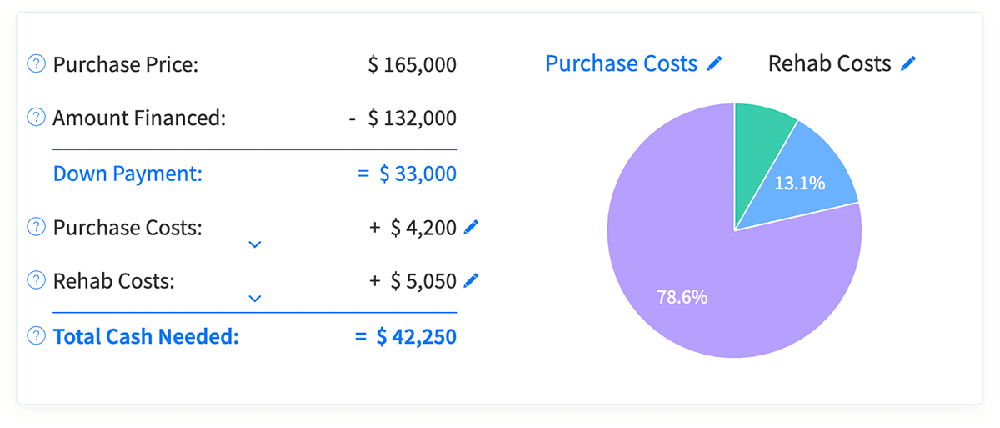
Check Comparable Sales (Comps). Most REI software includes a feature to look up recent sales and rental comps in the area. Use this to verify your assumptions. For example, DealCheck can browse through recent sales and comparable rental listings as well as auto-calculate an After Repair Value (ARV) and rent estimates for you. This is useful for flips or rentals to see if your expected price and rent align with the market. It even maps out comparables and calculates an average sale price vs. your deal price. This step helps ensure you’re not wildly off on valuations.
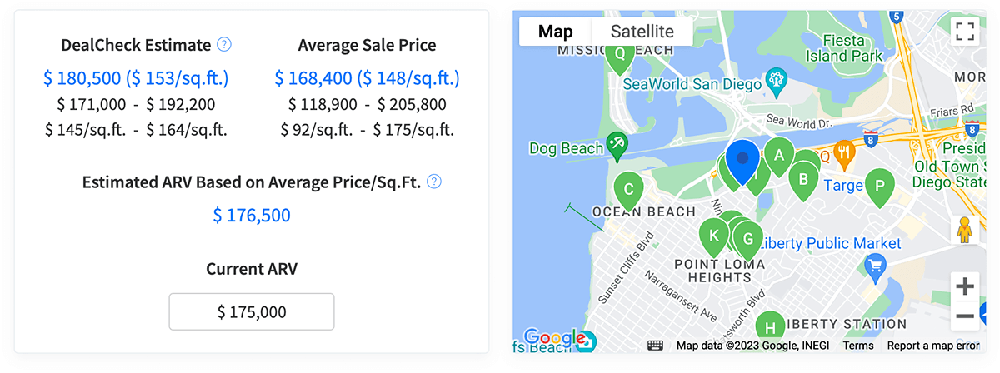
Interpret the Results. Now review the output metrics carefully. Key questions to ask:
- Cash Flow: Is it positive? (Monthly rent minus expenses should leave money in your pocket.) If the software shows negative cash flow, it may not be a good buy unless you have a strong appreciation bet.Cash-on-Cash Return: Industry veterans often look for CoC returns of 6–8% or higher on rentals. The software gives you this percentage immediately.Cap Rate: Is the cap rate competitive for the location? As a rule of thumb, anything above ~8% is generally good. If your cap rate is low, it might mean the property is overpriced or rent is low.Total Profit: For flips, check the projected profit at sale and how long it takes to break even.Breakeven Metrics: Some software shows your breakeven or how long to ROI. This helps gauge risk.
Compare Properties and Finalize. Finally, use the software to compare this deal against others. Many tools have a compare or portfolio feature to list multiple properties side by side. If you’re evaluating more than one potential investment, input the numbers for each and see which has the best returns. Revisit your key criteria: maybe a slightly lower profit in one deal is okay if it has 100% financing or is in a stronger market. The software makes these comparisons quick. Once satisfied, you’ll have a clear set of numbers to guide your offer or decision.
By following these steps, beginners will learn how to use REI software to analyze properties systematically. The process turns complex underwriting into a series of simple actions: collect, input, review, adjust, decide. And remember, if the software flags a deal as unprofitable, that’s valuable insight—better to walk away than lose money. The reason for the analysis is to get the truth and the software ensures you start with data.
Choosing the Right REI Analysis Software
There are many REI tools on the market, each with strengths. Here are a few popular ones that beginners often use (many also offer free trials):
- DealCheck: A user-friendly analysis app for desktop and mobile. DealCheck specializes in quick deal math for rental properties, flips, BRRRRs, and more. You can import property data, adjust dozens of parameters, and instantly see cash flow and ROI. It also provides comps and a maximum offer calculator. DealCheck’s reports are professional and easy to share. This tool is great for beginners because of its simplicity. You can start analyzing properties like a pro without the long lead time of learning.
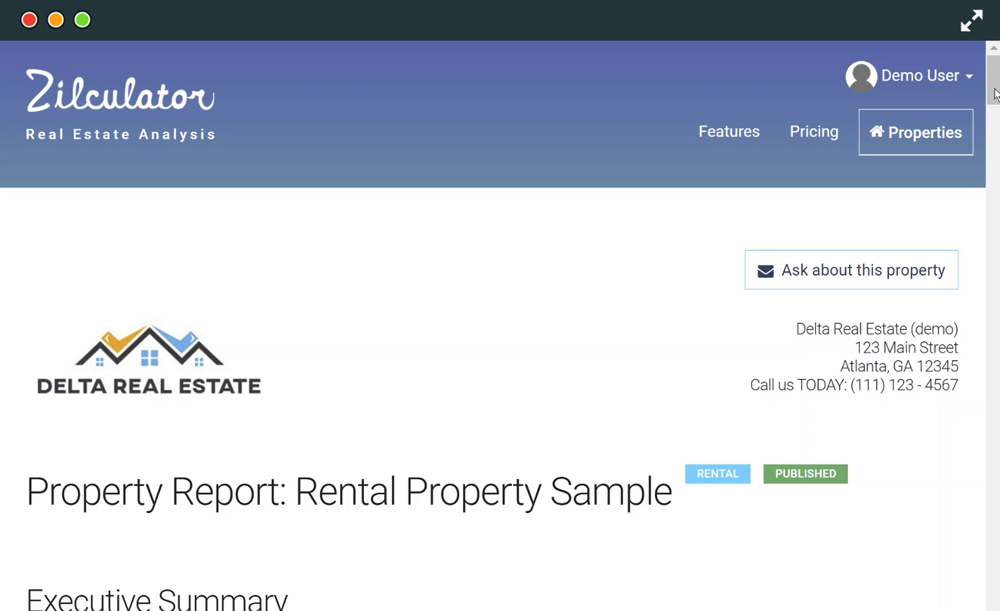
- Zilculator: Designed originally for agents, Zilculator offers fast analysis for rentals, flips and wholesale deals. It excels at automating data entry: Zilculator loads property data automatically from several sources so you don’t have to upload photos and type information manually. This means you can pull in tax and sale data instantly. It then generates interactive PDF reports. The interface is also very user-friendly
- PropStream: More than just analysis, PropStream is an all-in-one investing platform. It offers nationwide property data and advanced search filters, but also robust analytics. Key features include highly accurate comps, rehab and ADU calculators, and heat maps. You can draw custom map areas to compare neighborhood properties and find the true market value. It also has built-in Rehab Estimator and ADU calculators to plan improvements. After analysis, PropStream lets you generate detailed reports with transaction history and tax details. (Tip: PropStream’s heat map highlights local trends like rising home values or high foreclosure rates, helping you spot up-and-coming areas.) PropStream has more features than a beginner needs, but its data depth can be very useful once you grow beyond basic deals.

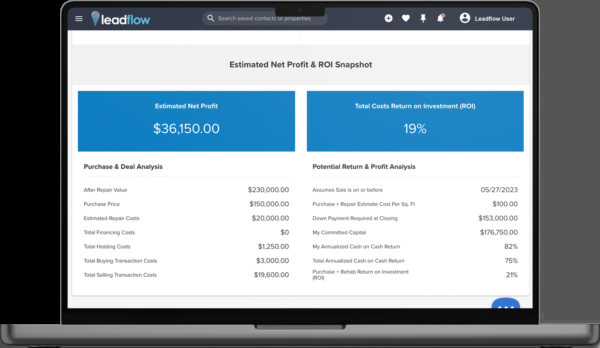
- Realeflow: This is an all-in-one lead generation and deal analyzer tool, popular with wholesalers and flippers. Its Deal Analyzer module lets you plug in offer price, rehab budget, financing, and more to project profits on flips or rental cash flow. Realeflow emphasizes making quick, data-driven offers. As their site notes, you can “project net profit based on different buying and selling scenarios for each property”, and the software helps you “submit well-founded offers every time”. The interface gives a clear ROI snapshot. This all-in-one approach is helpful once you’re ready to expand your investing business.
- Other Tools: In addition, many beginners start with simpler or free tools. Zillow, for instance, offers a Rental ROI Calculator that estimates ROI by factoring in rent, expenses and home value. BiggerPockets has a rental calculator that covers CoC, cap rate and more. These can give quick sanity checks. However, dedicated REI software saves you manual work and offers more depth than these basic calculators.
Each tool has its own strengths, but all of them follow the same analysis principles. The key is to pick one that you feel comfortable with and use it consistently. As you explore, keep asking yourself the question: Am I applying everything I’ve learned about how to use REI software to analyze properties effectively? For example, if you try a new tool, verify that it includes the metrics you need and that you can input all relevant expenses.
Tips for Effective Property Analysis
Verify Your Data: Always double-check the numbers you input. A typo in purchase price or rent can skew results. Tools may auto-fill some data, but confirm it’s correct. If the software shows wildly high ROI, something is probably off.
Consider Vacancies and Repairs: By default, calculators might assume 100% occupancy and underestimate maintenance. Use realistic vacancy rates (e.g. 5-10%) and budget extra for repairs or renovation surprises.
Run Multiple Scenarios: Experiment with different exit strategies. Many REI software let you toggle between “flip” and “rental” modes or adjust hold times. Checking both a flip profit and a buy-and-hold scenario on the same property is good practice.
Use Key Metrics Wisely: As noted, no single number tells the whole story. A high cap rate is good, but if it comes with near-zero cash flow, the deal might be risky. Pay attention to both short-term returns (cash flow) and long-term profits (resale).
Check the 2% Rule: A quick rule of thumb is that monthly rent should be around 1–2% of the purchase price. If a property rents for far less, you may struggle to cover costs. If your software shows rent per this rule, that’s a sanity check.
Compare Apples to Apples: If using different tools or spreadsheets, ensure you compare the same metrics. For example, some spreadsheets show gross ROI (ignoring costs), while others show net ROI. Stick to the ones you trust.
Learn the Lingo: Familiarize yourself with terms like NOI (Net Operating Income), DSCR, GRM (Gross Rent Multiplier) etc. Knowing what the software is computing will help you interpret its output correctly.
By following these best practices, beginners can turn complex analysis into manageable steps. Remember that the numbers from software are only as good as the inputs – it’s your job to feed it good data. But once done, you’ll find these tools invaluable for uncovering the true potential of any property.
Conclusion
Analyzing real estate deals doesn’t have to be overwhelming. With modern REI software, you can streamline the process and make informed decisions with confidence. By practicing the steps shown, you’ll quickly learn to spot good deals and avoid bad ones
Start using one of these tools on your next deal to see how smoothly the analysis can go. Soon enough, knowing how to use REI software to analyze properties will be second nature, and you’ll save time and money by never relying on guesswork again. Remember: the right software is like having a team of number-crunching assistants at your fingertips, helping you grow your real estate portfolio smarter and faster.


Add A Comment